Exchange Triggers
Exchange triggers is a feature in VisionsTrust that allows you to launch exchanges from configured contracts directly from the VisionsTrust platform instead of having to rely on in-house integration of PDC API endpoints.
Although this grants an easy way to launch configured exchanges, this takes away integration customisation features that you would have the freedom of implementing by doing your own integration of the PDC API.
Usage of the exchange trigger functionality in VisionsTrust is therefore your decision based on whether or not this fits your use cases.
Requirements
In order to use exchange triggers, you must ensure that:
- Your PDC version is
v1.10.0or higher - You have configured the Exchange Trigger API Key in your PDC to authorize VisionsTrust to trigger exchanges through your PDC
Overview
Exchange Triggers aim to simplify exchange launch workflows by providing an interface where you can find the following information:
| Exchange Type | Description |
|---|---|
| Project Contract 1-to-1 Data Export | You are a data provider in a project and wish to run a data 1-to-1 data exchange with another member of this project acting as the data consumer / service provider |
| Project Contract 1-to-1 Data Import | You are a data consumer / service provider with a service-based offer in a project and wish to trigger a 1-to-1 data exchange with a data provider in the project |
| Service Chain exchange | You are either the orchestrator, the first element or the last element in a project service chain and wish to launch the service chain workflow |
The GUI is setup in a way to display all of the valid exchanges in your signed contracts.
For an exchange to be displayed on the interface, the following requirements must be validated:
| Requirement | Why |
|---|---|
| You must be part of a project | Project contracts are what enable the authorization of triggering data exchanges in the dataspace. If you are not part of any project, you will not see any available exchange on the exchange triggers page. |
| You must offer at least one offer in the project | This is implicit to being a member of a project. To realize any kind of data exchange in a project context, you must provide a data / service / infrastructure offer to the project and it MUST be technically configured to work. |
| You must have agreed to the project contract | Unsigned contracts are not considered valid and do not enable data exchanges. |
| The other party/ies must have agreed to the project contract as well | If the other party you wish to realise an exchange with has not agreed to the contract, then the exchange is not considered valid and will not be displayed on the interface. |
GUI Walkthrough
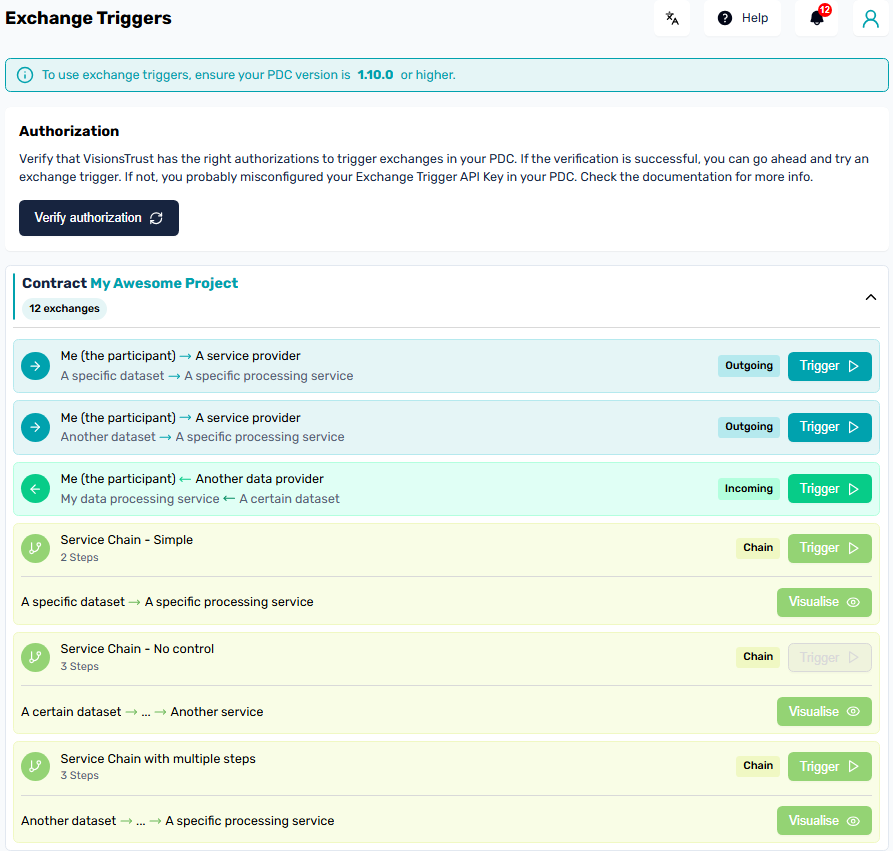
The displyed interface will showcase all of your valid project contracts. Selecting one will open the individual exchanges available inside the context of this contract.
3 types of exchanges are identied:
- Outgoing: Means you are the data provider and can run a 1-to-1 exchange with a service provider inside the project
- Incoming: Means you are the service provider and can run a 1-to-1 exchange with a data provider inside the project
- Chain: Represents the available service chains that can be launched.
Each trigger button will take you to an information modal where you'll be able to optionnaly setup the parameters you might define when integrating exchanges from the PDC APIs directly and then actually trigger the exchange.
Info
An important note about service chains is that the interface will display all of the service chains available in the project even though you might not be able to trigger all of them for informative purposes. To be able to trigger a service chain, you need to be either the first or last node in the chain. In case you are not one of these 2, the "trigger" button will be greyed out.
Setup
Exchange Trigger API Key
The Exchange Trigger API Key is a new configuration key that should be setup in your PDC. Its purpose is to grant authorization to VisionsTrust to communicate with your PDC in order to trigger exchanges from the platform.
The Key can be found in your profile under the api tab.
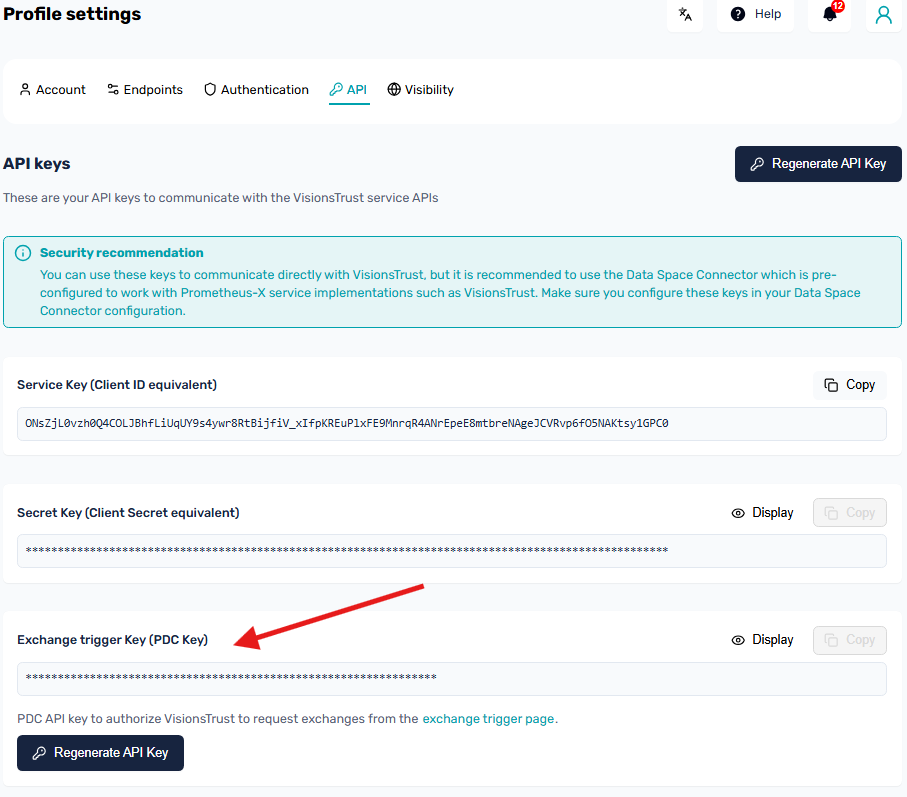
This key should then be added to the environment variables of your PDC configuration to ensure proper functionality.
// PDC .env file
{
    // ...existing configuration
    "EXCHANGE_TRIGGER_API_KEY": "YOUR_VISIONSTRUST_EXCHANGE_TRIGGER_API_KEY"
}